




Inside your download
An urgent email. An unfamiliar link. Know how to check before you act.
You open your laptop to pay a bill, look through your photos or reply to a message. A warning pops up in your browser. Or an email says you need to sign in straight away. In that moment, having a clear next step makes a difference.
Stay Safe on Your Laptop and Mac, published in German as Sicher am Laptop und Mac, is Klarfino’s practical PDF guide for people who want to use their computer with more confidence. Learn how to prepare your Windows 11 laptop or Mac, check an unexpected request and find the right instructions if you have already clicked. You can start with the question you have today and work through the rest at your own pace.
When a message rushes you into a decision
A delivery email asks for a small extra payment. A message that appears to come from your bank threatens to lock your account. A browser window tells you your computer is in danger and gives you a number to call. A request like that can feel especially convincing when you really are expecting a parcel or have just paid for something online.
Other questions are quieter but just as easy to put off. What kind of file did you download? Could you get back into your email account if you lost access? What personal details are in the letter you are about to paste into an AI tool? The guide takes these situations one at a time, with a place to begin even if you have little technical experience.
A practical plan for your computer, accounts and files
Start with the device you use. The guide gives Windows 11 and macOS their own sections and walks through updates, built-in security settings and permissions. If you want to review your browser, you can go straight to the sections on Chrome, Safari, extensions and notifications.
Next, look at your accounts and files. The guide explains how to review the recovery details for your email account, add protection to your sign-in and use a test file to check that you can restore a backup. The quick reference takes you to separate instructions for situations such as opening a suspicious page, entering a password or opening an unfamiliar file.
See how each step is explained
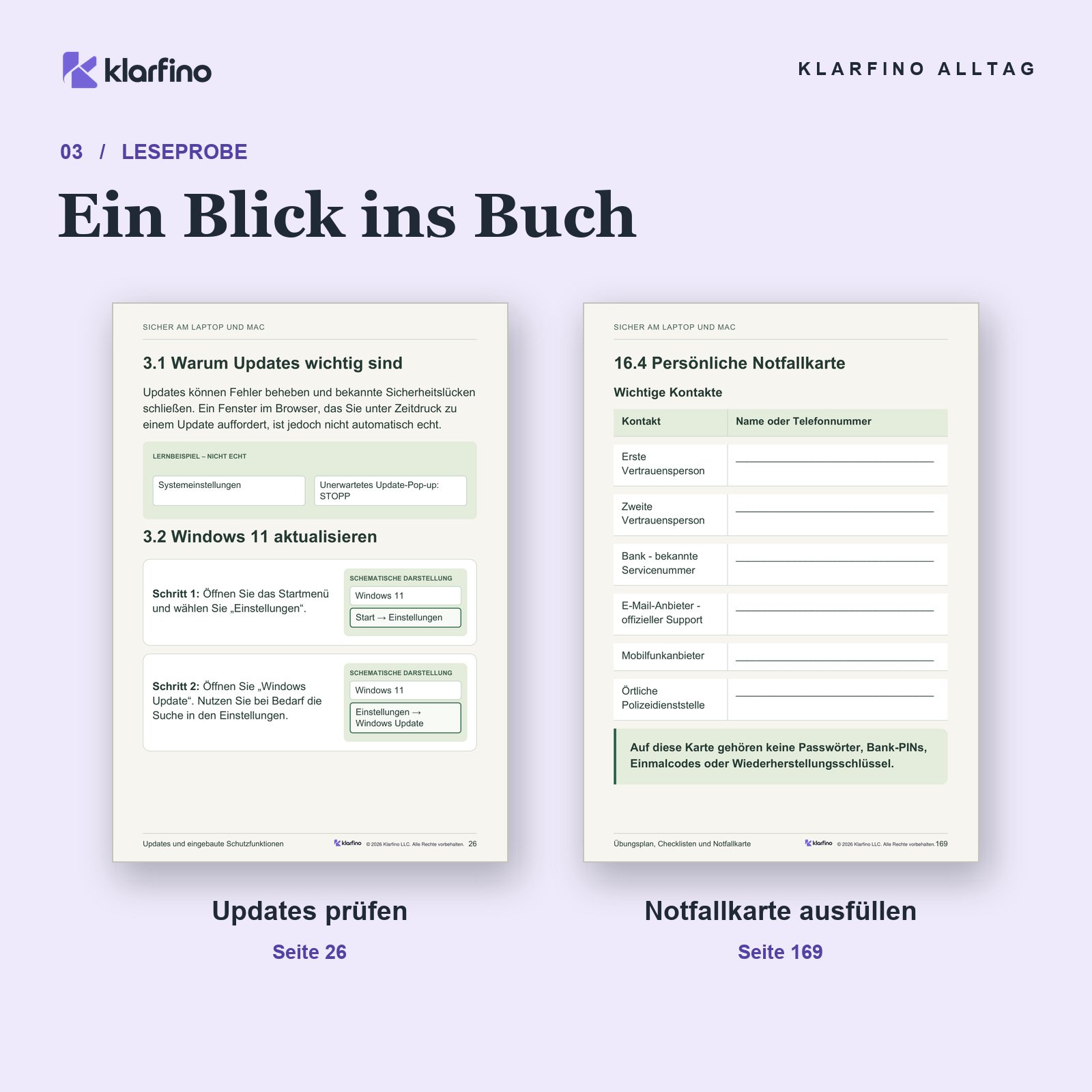
Klarfino identifies the source of real screenshots and labels simplified diagrams so you can tell them apart. Simulated messages are marked as practice examples. For technical settings, the guide points to sources including Microsoft, Apple and Google support.
If your screen looks different from an illustration, you can read what the setting does and check the official instructions for your version. A glossary explains terms such as domain, passkey and encryption in plain language, so you can look them up as you go.
What you can do with the guide
Start with the situation you encounter most often. Maybe you want a better way to check incoming messages, or perhaps you want to know whether you can recover your photos and documents. The guide walks you through tasks like these.
- Check links before you open them. Look at the sender, the reason for the message and where the link leads. The Bitdefender Link Checker chapter explains how to read a result and when to verify the request separately.
- Prepare your important accounts. Review sign-in protection and recovery details. If an account shows unusual activity, use the account recovery chapter to find the checks that apply.
- Make sense of downloads and backups. Learn to recognise file extensions and practise restoring a harmless file from a backup.
- Find the right steps after a click. Use the section for what actually happened. Opening a page, entering a password and installing a program each call for different checks.
- Share less personal information with AI tools. Use the guide’s green, yellow and red rule to decide what you are comfortable sharing, what to remove first and what to keep private.
Inside the guide, a delivery message with a catch
In one simulated message, a sender claims your parcel will be returned unless you pay a small fee immediately. The guide helps you look at the sender, the payment request and the time pressure. Then it asks a question you can use in everyday life. Can you check the delivery through the carrier’s official app or website, opened separately?
A second practice message claims to come from a bank and gives you a tight deadline to confirm your identity. Working through both examples helps you notice similar warning signs in different situations. You can read the examples on your own or go through them with someone you trust.
What you receive
You receive one 177-page German-language PDF with 16 chapters. It covers Windows 11, macOS, Chrome and Safari, as well as suspicious messages, personal data and AI tools. Inside the PDF you will find:
- A linked quick reference for common situations, including what to do after opening a suspicious link and where to start if you lose access to an account.
- A 14-day practice plan and a monthly checklist, so you can spread the work across several sessions.
- A short quiz with answers and a personal emergency card for important contact details.
- A glossary and source references for looking up unfamiliar terms and settings.
Check that it fits the way you use your computer
The guide is for people who use a Windows 11 laptop or a Mac and are comfortable following written instructions in German. You need a device that can open a PDF. If you like having the instructions beside you while you work, you can keep the PDF open on a second screen or a compatible tablet.
Menus and features can vary by device and software version. The PDF includes references to official help for key settings. If you are choosing the guide for a relative, check which computer they use and ask what they would like to learn first.
Practise while you have time to look things up
A quiet afternoon is a good time to check your recovery details. The practice plan begins with small tasks such as identifying your operating system and checking your screen lock. Later exercises take you through backing up and restoring a test file or identifying warning signs in a simulated message.
When you next need the instructions, you will know where to find them and which contact might be able to help. Return to the monthly checklist when you set up a new computer or want to review your settings.
Get the guide and choose your first task
After purchase, open the quick reference and pick one thing you want to do today. If you want to protect your email account, go to the chapter on sign-in and recovery. If an unusual message is what brought you here, start with the parcel example and see which details you would check.
When you have to find everything under pressure
It takes time to find a trusted support number or the correct sign-in page when you are already dealing with a suspicious message. If a file has gone missing, you also want to know whether your backup can be opened. The emergency card gives you a place to record useful contacts, and the practice plan lets you try a restore with a test file.
Collect those details while you have time. If an unfamiliar request arrives or you need to recover a file, you can start with what you have already prepared.
P.S. One task is enough to get started
Check one setting, restore one test file or talk through the parcel example with someone you trust. Choose the action that would help you most right now. With the guide, monthly checklist and emergency card nearby, you have somewhere to turn when the next question comes up.
Frequently asked questions
What language is the guide in?
The ebook is a German-language PDF. This product page is also available in English.
What devices does it cover?
The guide covers Windows 11 and macOS, with sections on Chrome and Safari.
How do I get my copy?
After payment is confirmed, your order gives you access to the PDF download.


Reviews
There are no reviews yet.